Cookiecutter-Spatial-Data-Science 3.15.0
A project template for spatial data science work that combines ArcGIS Pro, modern data science tooling, and Conda environment management — with best practices baked in from day one.
Data science work is two things at once: messy creative exploration and reproducible delivery. Trying to impose structure mid-exploration kills creativity; skipping it altogether kills reproducibility. This template gives you the structure up front so you can do both — explore freely, then reproduce and hand off the results with minimal effort.
→ Read more about why this exists, the opinions behind it, and where it came from.
Getting Started
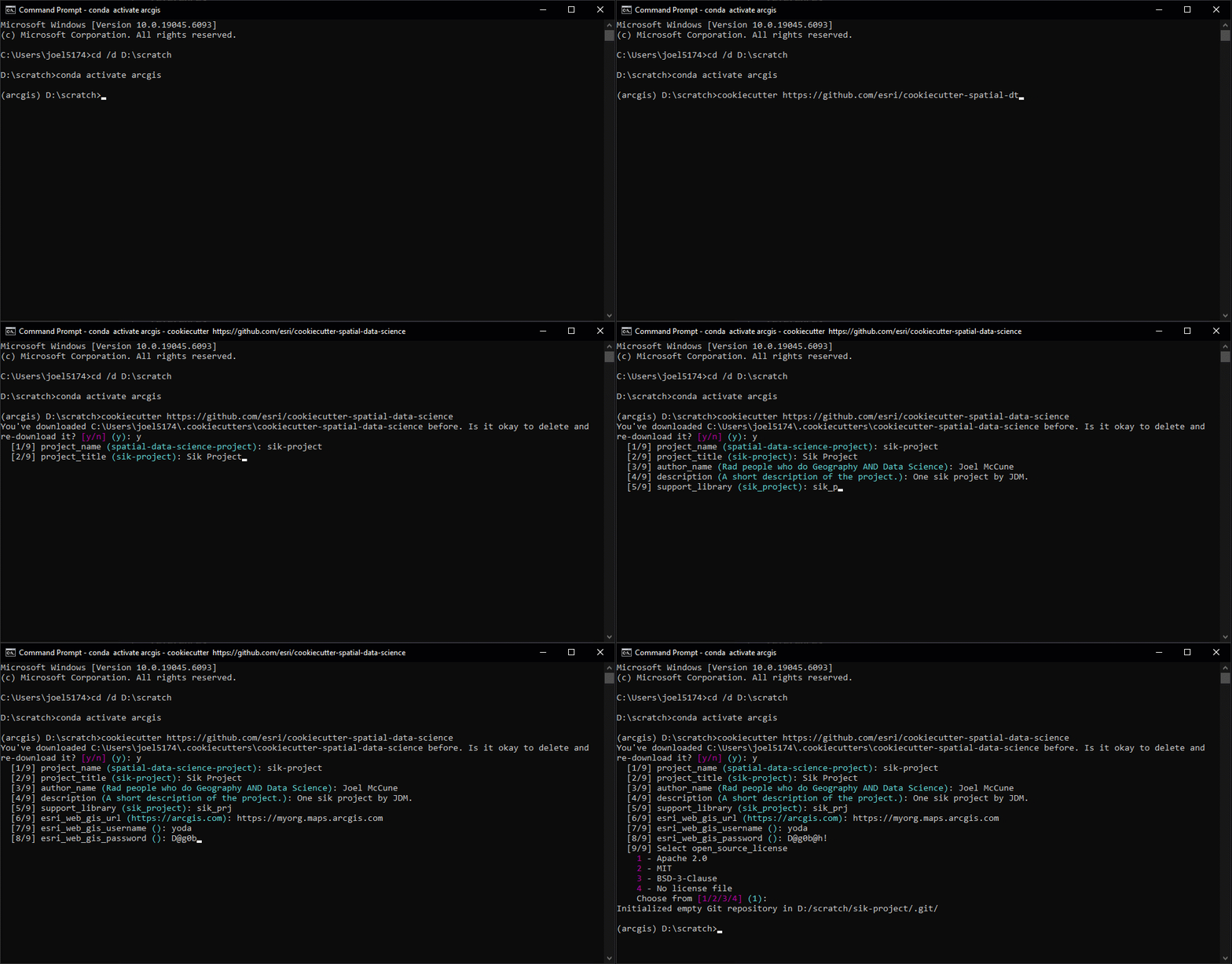
Setup and basic use are detailed with copy-paste-ready commands on the Getting Started page.
What you get
A project with this layout (showing top-level only — see the Cookiecutter Reference in the repo for the full tree):
my-project/
├── arcgis/         # ArcGIS Pro project, toolboxes, layer files, styles
├── config/         # config.yml + secrets.yml (gitignored)
├── data/           # raw / interim / processed / external (gitignored)
├── docsrc/         # MkDocs source for project documentation
├── models/         # trained models and *.emd metadata
├── notebooks/      # exploratory Jupyter notebooks
├── reports/        # figures and logs
├── scripts/        # standalone automation scripts (data pipeline, etc.)
├── src/<package>/  # reusable Python package (with sql/, utils/)
├── testing/        # PyTest suite
├── AGENTS.md       # AI agent guidance (Copilot, Claude, Cursor)
├── environment.yml # Conda dev environment
├── pyproject.toml  # Python package config and runtime dependencies
└── Makefile        # common commands (env, data, docs, test, jupyter)
Highlights:
- First-class ArcGIS Pro integration — the
arcgis/directory is wired up to a pre-configured.aprx, traditional toolbox, and Python toolbox. - Conda-managed environments via
make env, including ArcPy when available. - YAML-based configuration with environment overlays (dev / test / prod) and gitignored secrets — see Configuration.
- MkDocs documentation with mkdocstrings auto-generation, ready to publish via GitHub Actions.
- PyTest scaffolding with reusable spatial fixtures (
temp_gdb,temp_dir). - DuckDB-friendly SQL package at
src/<package>/sql/— see SQL Queries with DuckDB. - AI agent guidance in
AGENTS.md, automatically split into per-context instruction files for GitHub Copilot at project generation.
Opinionated by design
This template is opinionated — meaning it has decided how things should be done and made those choices the path of least resistance. Folder names, environment manager, configuration format, secrets handling, even the SQL package layout — all picked so you can stop deciding and start working.
If the defaults fit, you move fast. If they don't, most are easy to override. Either way, the choices are deliberate, lessons mostly learned the hard way, and documented on the Opinions page.
Debugging template generation
If cookiecutter fails or behaves unexpectedly, run with verbose logging:
cookiecutter https://github.com/esri/cookiecutter-spatial-data-science --debug-file cookiecutter-debug.log --verbose
This writes cookiecutter-debug.log in the current directory and streams verbose
output to the terminal — both very useful when diagnosing template issues.